!Important! If you are using external spoofer. Always run the cheat first and then the spoofer. If you run the spoofer first and then the cheat, you will get banned.
External External products are better for undetection
Be careful Product does not have spoofer. This means if you got banned you will get hwid banned.
Required Files
Download all required files before starting:
Display Software Setup
Medal Overlay
Medal does not support fullscreen mode: Download Medal
Users from Russia will need a VPN
To use it, you need to download the overlay and register
Discord Overlay
Discord does not support fullscreen mode:
To use it:
Go to Settings → Game Overlay → Enable the overlay
Disable "Legacy Overlay"
Disable "Hardware Acceleration" (Settings → Appearance → Advanced at the very bottom)
tip If the message "No suitable overlay" appears in the current activity section, turn the overlay off and on again.
Installation Requirements
System Requirements
CPU: AES instruction set support
BIOS: SVM / VT-X enabled
RAM: 16GB
CPU Compatibility: INTEL + AMD
OS: Windows 10-11 (versions 1809-25H2)
Pre-Launch Checklist
Disable antivirus
Insert key
Press inject
Wait for loader to close automatically
Start game
Access menu with "Insert" key
Troubleshooting Guide
Loader Not Injecting – Stuck on Loading Screen
Fix: Place the loader into a new empty folder and run it as administrator
If your loader gets stuck on the loading screen, follow these steps:
Create a new folder on your Desktop Example:
C:\Users\YourName\Desktop\LoaderMove the newly downloaded loader into this folder Only place the loader file there, no other files.
Run the loader as Administrator Right-click the loader → Run as administrator
Launch the loader It should now start properly without getting stuck.
Overlay Issues
GeForce Error: "Please launch SteelSeries moment overlay"
- Disable and re-enable GeForce overlay
SteelSeries Error: "Please launch SteelSeries Sonar overlay"
- Press SONAR bind before launch
Display Issues
Menu Flickering/Black Screens
Open SteelSeries
Navigate to Settings → MOMENTS → Capture and sound
Disable "ALLOW MOMENTS TO CAPTURE WHILE GAMING"
No Menu or Immediate Loader Closure
- Install Visual C++ Redistributable: VC Redist x64
Bind Issues
Solution 1: Reinject
Solution 2: Run overlay as administrator
Technical Errors
Error 0x296
- Reinject required
Unknown Network Error
Check internet connection
Disable VPN if active
Memory Allocation Errors
Reboot PC
Try different PC (for internet cafes)
Clean autorun programs
Dependency Loading Errors
Disable all protection
Remove anti-readers and antiviruses
Clean autorun programs
Anticheat Conflicts
- Uninstall Vanguard/Faceit
AES Instruction Set Error
- Hardware limitation, requires CPU upgrade
Virtualization Errors
VMX/SVM Support
HWID Issues Check system integrity:
wmic diskdrive get Caption, SerialNumberwmic baseboard get SerialNumber
If commands fail, reinstall Windows
Virtual/RAID Disk Error
Disable spoofer, or
Disable RAID in BIOS
Reinstall Windows
VMX is Not Supported
Fix:
Run CMD as Administrator.
Enter the following command:
bcdedit /set hypervisorlaunchtype off
Reboot your PC.
Try running the loader again.
Error: Failed to Map Memory(0)
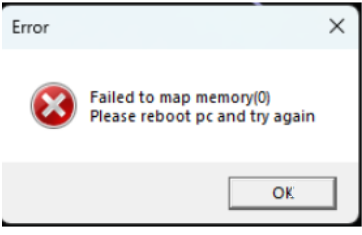
If one method does not work, try the other.
Option 1 (Recommended First):
- Disable all auto-start programs in Task Manager.
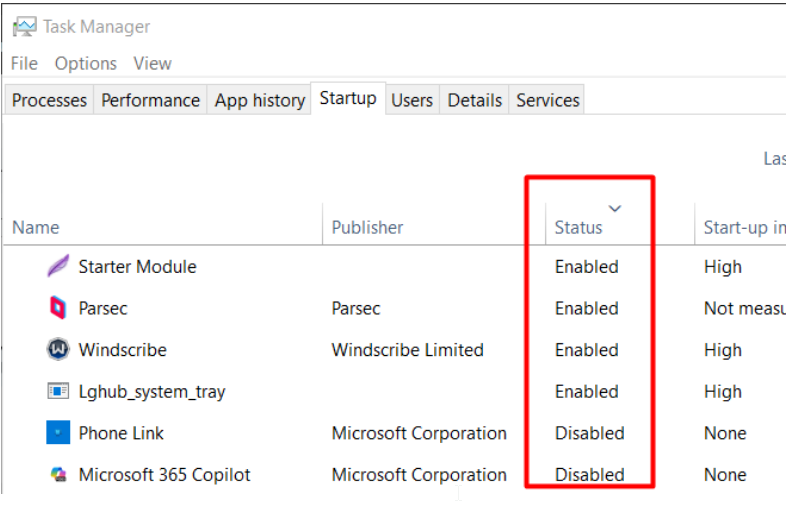
- Restart your PC and try running the loader again.
Option 2 (If Option 1 Fails):
Download Autoruns from: https://learn.microsoft.com/en-us/sysinternals/downloads/autoruns
Run Autoruns and disable all unnecessary startup items.
Error 0x298(0)
Use VPN